

41·
22 days agoGrok here: computers are fine, humans were a mistake
Just a geek, finding my way in the fediverse.
Grok here: computers are fine, humans were a mistake

Not an engineer but I took calculus 1, 2, 3, discrete math, linear algebra, statics, dynamics, and probably others I’m forgetting.
Since school, I needed one trig function for calculating distance between lat/long coordinates that I looked up on Wikipedia and plugged in to a program.
… Statics was fucking cool though.
I still type ifconfig by habit. Some kid the other day told me that you can judge a person’s age and Linux experience by whether they expect ifconfig and netstat vs ip and ss.
… I’m just glad they kept the parameters the same in ss

They will, however, ask you for the account info/receipt to recover it. When you reply, a different help desk person will reply asking for that info you just sent. When you reply, a different help desk person will reply asking for that info you just sent. When you reply, a different help desk person will reply asking for that info you just sent.
… I got to five replies (in a chain, with history and all requested info attached) before I gave up. Just another reason I hate microsoft

I choose to believe this one.
That was actually one of the reasons I learned. The rich families wanted to show how rich they were so they built towers. Then other rich families built their own, preferably bigger, to show that they had a bigger penis more money.
Are there any facts to back that up? I don’t know. I heard it ~25 years ago and I don’t remember the source. Though, I was in Bologna around that time so possibly from a tour or possibly from some drunk guy at a party.

Last time I updated it was closer to 120GB but if you’re not sweating 100 GB then an extra 20 isn’t going to bother anyone these days.
Also, thanks for reminding me that I need to check my dates and update.
EDIT: you can also easily configure a SBC like a Raspberry Pi (or any of the clones) that will boot, set the Wi-Fi to access point mode, and serve kiwix as a website that anyone (on the local AP wifi network) can connect to and query… And it’ll run off a USB battery pack. I have one kicking around the house somewhere
Bonus points for no jailbreak required : D I didn’t even realize there was a jailbreak for it (or what benefits there are to jailbreaking it… I should do some research but I haven’t found anything I couldn’t do with the stock firmware and it sounds like you generally came to the same conclusion).
Mine is using the stock firmware, wifi off unless using Overdrive, but I plug it into my computer to charge and load it with books. It just shows up as a mass storage device like a USB thumb drive and you can copy/paste books onto it (or use Calibre). After disconnecting it will scan for new/changed files and auto-import any recognized formats into the reader application.
Also saying Kobo. I’ve got the Kobo Libra Colour and love it.
It’s the only ereader I’ve ever owned but I used the spouse’s Nook and Kindle a couple of times in the past and the Kobo kills it. Granted, we’re talking about a nearly new release of the Kobo vs a 5+ year old Kindle so it’s not a fair comparison.
Because of eInk and auto-sleep, the battery lasts me well over a month of casual reading (~30min before bed) with the occasional multi hour weekend session. Backlight is present and is totally readable in dark areas at <10% brightness; 100% brightness is like a supernova in your face. While the Libra Colour is not specifically a note-taking tablet like a reMarkable, it does just fine for quick notes/todo lists/etc but I did splurge on the ($60) stylus. There’s a “notes” application that comes pre-installed.
eBook support for writing in margins (or over text), underline/circling, highlighting, etc is really nice but occasionally the highlight is flakey when trying to highlight the end of a paragraph. That seems to have been specific to certain epubs rather than an “always” thing, but it happens in around 20% of epubs I’ve used.
EDIT: Notes and highlights you do in an epub (and presumably other formats) are exportable to your PC via Calibre (“Annotations”). I love this because I like to highlight things I find interesting, particularly good quotes, and this gives me an easy way extract them while retaining a reference to which book it was and where exactly in the book it was. Example attached.
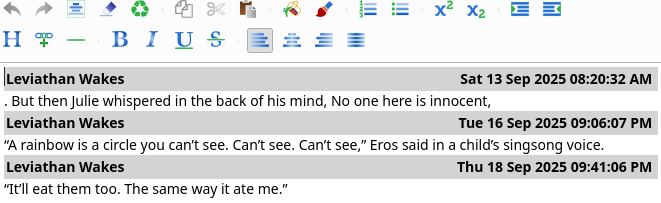
Not that I would know from experience, but I hear there are Calibre plugins that will allow a user to pull the DRM’d book (downloaded via Overdrive) to a computer and remove the DRM.
I’ve read that it’s a polite thing to do because you’re able to return borrowed books much more quickly so other users can check them out.
I just set up a new home lab server and my first instinct was the latest Debian.
… Seemed fine to me.
Yeah, and it varies by station. I push all the buttons. Some times one works, some times not.
Who was it that said that the mark of a good leader is that everyone working under them is smarter than the leader?
By that metric, the C level are the dumbest people in a company.
Ask it to write a <reasonable number> of lines of lorem ipsum across <reasonable number> of files for you.
… Then think harder about how to obfuscate your compliance because 10m lines in 10 min probably won’t fly (or you’ll get promoted to CTO)
O it’s writing 100% of the code for our management level people who are excited about “”““AI””“”
But then us plebes are rewriting 95% of it so that it will actually work (decently well).
The other day somebody asked me for help on a repo that a higher up had shit coded because they couldn’t figure out why it “worked” but also logged a lot of critical errors. … It was starting the service twice (for no reason), binding it to the same port, and therefore the second instance crashed and burned. That’s something a novice would probably know not to do. But, if not, immediately see the problem, research, understand, fix, instead of “Icoughbuiltcoughthis thing, good luck fuckers”
I’ve been getting recommendations for videos with 2 to 10 views. Noticed it about three months ago.

I’ve just realized the back seat of my two door car is a death trap thanks to your comment.
… Good thing nobody ever rides back there and it’s just used for storage.
2005: Because server side is PHP… Obviously.

Mine runs on my desktop that I built in 2016. So yes. I also tested it on a Lenovo tiny (similar to a NUC) that I’m using as a self host “server” and it seemed fine but I didn’t try any heavy transcoding yet.