

3·
2 years agoIt is. You are allowed to download it as it has a trial. But when it’s time to pay the only way is through a logged in account on the Microsoft store.
It is. You are allowed to download it as it has a trial. But when it’s time to pay the only way is through a logged in account on the Microsoft store.
shit drives me bonkers. I tried to get the Dolby Atmos plugin. Has to be done on the store, which HAS to be signed into windows. No i dont want any of that. let me buy it from your site and redeem a code or something. I dont want to sign into the store. at all.
I just went with the alternative. Installing the logitech control software, restricting its internet access but using its dolby DTS features.
Based on the bottom of the receipt i would have said to the server something like “great, it says right here no need to tip”

Yeah it’s not too bad. Just the dash kit is fairly old and held together by those plastic clip. I always break those things. It’s a juice isn’t worth the squeeze honestly. I actually upgraded my radio a while back to a wireless CarPlay/android auto and mean to ask them to swap em. But forgot.
If my windscreen starts to steam up mid-jourmey, the last thing I need is to take my attention off the road to change the climate settings in the UI where dials and buttons will do the job much faster without needing to take my attention off the road.
This is why ill never get rid of my 2009 Tacoma. Three knob AC controls are the pinnacle of UI engineering. One knob for fan speed, one for temp and the third for vent/airflow selection. The backlight on one of my knobs has burned out at this point, but i dont need it…Can adjust the AC without taking my eyes off the road.
When it was ubiquitous, this meant i could do this in any car. Borrowed my inlaws FORD F-150 once, had to pull over to figure out how to turn off the goddam heat. It had BOTH a touchscreen and series of dash buttons but there were so many it was hard to figure out what did each thing while driving. I also had to update their dang infotainment, it wouldnt work on some random USB device, i had to go get a USB-A 3.0 device to get it to work at all and even then it was idling in my driveway for an hour and a half. Even tried just doing it via WiFi…nope
I didn’t know exploding heads shut down.
I have noticed a decent drop in the discourse myself and thus, am simply pulling back.
Size doesn’t matter to me as much as activity. And it’s just not to active in the topics I’m interested in discussing.
Instances shut down?
Im not making a statement, im askin.

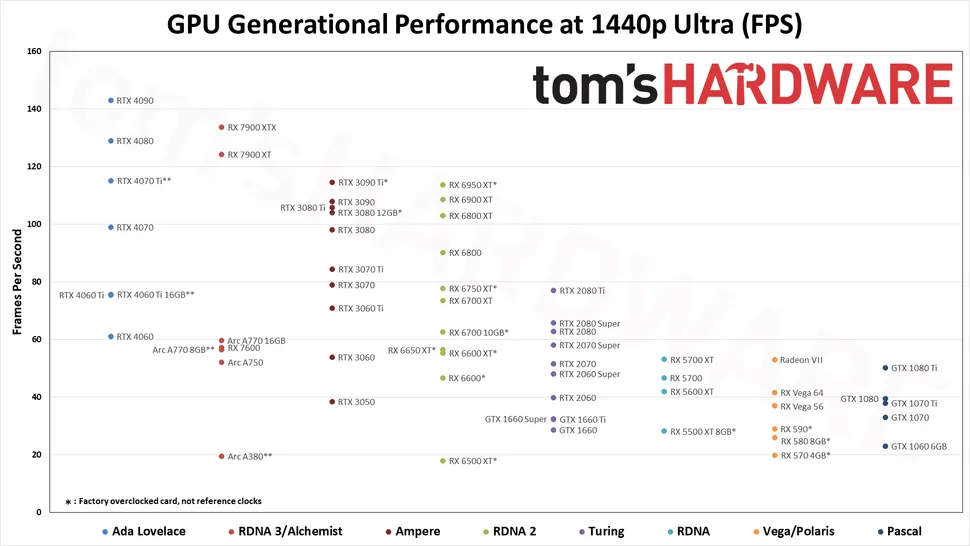
I saw this graph floating around
https://cdn.mos.cms.futurecdn.net/QKdmNvH8KqrZmnnqRDiz6k-970-80.png.webp
I saw a graph yesterday that put them squarely between the nvidia 4000 and the latest AMD gen in terms of performance. M
Edit: I have bad memory. Here’s the graph. https://cdn.mos.cms.futurecdn.net/QKdmNvH8KqrZmnnqRDiz6k-970-80.png.webp
For me, this was because the PS4 uses USB 2.0 that caps out at 480 Mbps. It was basically doing checksums of the backup files vs the restored and it just took time, even when the backups I had it running on were a sata SSD.
Would agree. Especially re:Nintendo.
One of my biggest annoyance is when you have multiple switches on a family account. If you use cartridges local co-op (or whatever it is called) requires two copies of the game (a cartridge in each). If you have the downloaded versions/digital download, then any device on the Nintendo account (ie: 2 switches for kids on a family account) can play against each other locally.
I don’t think you can cache/save a cartridge to a device to be able to do their local play feature (ie via ad-hoc connections in a car)
I have backups of my games on a PS4, which is air gapped (because the USB interface took a shot of lighning and no longer works).
I have been able to restore them and play games/saves on this console.
Here: https://www.playstation.com/en-us/support/hardware/ps4-back-up-and-restore-with-external-storage/
FTA:
PS4 console data you can back up Backing up your data regularly is a great way to ensure that important data is saved. You can back up the following types of data saved to a USB drive.
- Games and apps
- Saved data
- Screenshots and video clips
- Settings
All user data saved on your PS4 console (excluding trophies) is included in the backup data. When you restore your backup data, your PS4 console is reset, and all data saved on your console is erased. If you want to return data without restoring your console, use USB extended storage or cloud storage.
I have backups of my PS4, with games downloaded from the PS store that say different.
Heck any Playstation disc games tries multiple times to get you to save it to the HDD.
Not to mention that as long as it’s a digital download, you don’t own the game - you lease it at a flat rate.
not true all the time. Plenty of games once you have the files are easily able to run. KSP is one such example. I can just copy the KSP folder to any computer and play the game.
Its the devs choice to require things like Steam to validate the game etc.
You download them and back them up. What happens if the disc is scratched or your buddy drops a blunt on it?
I do similar. For laptops and docks, especially if they change setups it can be a pita (though you just need to copy files around).
Also the DE monitor config (ie that you use to login) is logically different to a users x config. So you gotta copy that over to make sure the primary monitor etc is right.
There are quality docks that work on displaylink. The dell D6000 is one example and we issue them out freely at work.
Most third party off brand docks will have higher failure rates. We see that with some anker docks that were usb-c+pd we use/had to source during the great supply chain snafu during covid. They worked in a pinch but aren’t reliable like a Lenovo or Dell dock. That’s less a displaylink thing and more a cheap dock thing.
DisplayLink compresses everything over usb. If you plan to do anything color sensitive (ie photo editing) or latency sensitivite (ie: games) it’s a bad idea sine it’s all cpu compression.
That said. They are great for multi monitor general usage (ie soreadhseets and shit) or for systems with graphic card limitations on multi display output (ie low end macs on m1/m2)
I’m on an i7-1165g7 and 1070 on windows. 25-30 fps at 1080p.
It’s completely GPU bound. I have a 4060 ti 16 gb in the mail. We’ll see how it plays.





Its quite common on email domains.
I have a .email gTLD and I am frequently told its not a valid domain. Its getting better but apparently many forms only consider .com, .org, .edu etc valid.