
pewpew
- 2 Posts
- 161 Comments

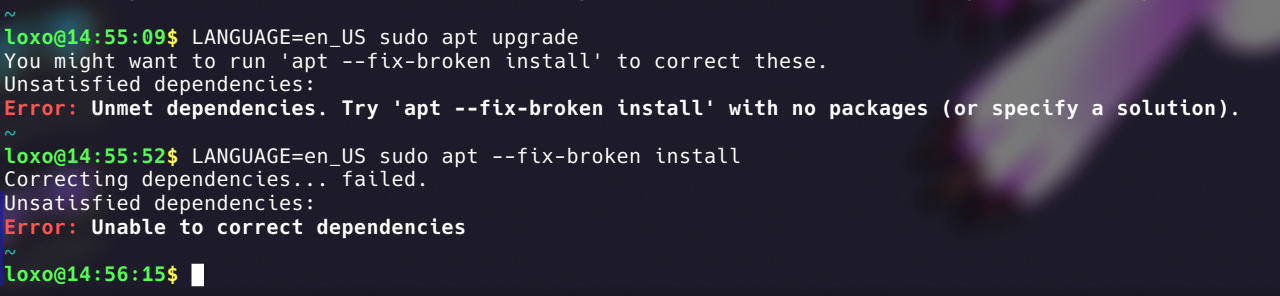
Correction: My filesystem is not read only. Dpkg can install .deb packages just fine
My guess is that I tried to update packages in a specific time that there was a dependency issue in the Debian Unstable repository.
Cosmic actually compiled and installed perfectly and the system still works and runs stable. It is a problem with Apt
I’ve been using Debian Unstable for about one year since I wanted Plasma 6 so bad. Even after Trixie came out I didn’t switch back to Stable because it runs good and gets frequent updates.
The experience was actually quite smooth, better than what my friend has with Kubuntu, which for every distro update has a 50% chance of breaking
No, I just figured it out. I had to enable a systemd service to test Cosmic. I have disabled it and now dpkg works and I manually installed Aptitude with its dependencies.
I tried to do an upgrade with Aptitude but it won’t do anything. I’ll look into it more later
Somehow I can’t even install aptitude trough dpkg because it says that the filesystem is read-only
What’s the output of apt —fix-broken install, like the big red error message suggests?
You can see it in the post image. I’m using Debian Unstable
My best guess is that the Debian Unstable repository doesn’t have all the libc6 packages updated to the same version. I might just have to wait and see what happens
I regularly update using a macro in the terminal that just runs
sudo apt update && sudo apt upgradebut this time I decided to install an update via the COSMIC store
Just did all of them and rebooted. No luck
Nope. Sources look good. I just removed some I don’t use anymore and then did an
apt-get cleanbut it’s still broken
 8·11 days ago
Sell a problem, sell a solution
Ok but 56kbps is just evil

I have a Thinkpad X395 which I bought refurbished. I has average specs for a laptop, you can find it with up to 16 GB of RAM and a quite nice 1080p touchscreen (depending on the configuration). Also it may come with a fingerprint reader, an LTE modem or a Smartard reader. I don’t know how serviceable it is because I have never opened it but you can easily remove the keyboard by unclipping some clips and undoing some screws, you don’t have to open the case
I get reccomended slop for kids, not AI slop, actual human slop content

Waiting patiently for GenZ Linux

That means nothing

I have a GTX 1060 and I’m stuck on kernel 6.16.5, maybe OP should try this?