I don’t understand what tab groups are from the description in the article. How are they different from keeping groups of tabs in separate browser windows? Is this just something I don’t understand because I don’t keep tabs open forever?
They are mostly the same as keeping them in separate browser windows, but with the advantage of being in one browser window. They also have the advantage of being label-able.
I don’t keep tabs open forever, but back when I used Chrome I regularly used tab groups when I was working on multiple projects simultaneously; the Jira ticket, the PRD, the API documentation, the necessary AWS consoles, and the GitHub PR for one project go in a tab group. Name that group and collapse it, and now you can easily reopen it again when you’re ready to switch contexts.
“Why not just put them in a separate window?” Sometimes that’s preferable. Sometimes both solutions together are better. On a single monitor, having everything in one window is usually preferable for my workflow. In any case, you can’t name a separate window. And if you use a sidebar extension, they aren’t persistent across multiple windows.
“Why not just use bookmarks?” Bookmarks are a long term solution. Tab groups solve the short term problem. They’re ephemeral.
“Why not just close the tabs until you need them again?” I do that as much as I can. But it’s not practical in all cases. One project is in active development, one is in PR Review, one is in QA, and I have a support escalation I need to work on in the meantime. Each of those tabs might be needed at any time during the week.


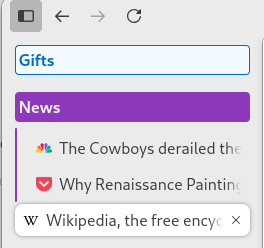
I don’t understand what tab groups are from the description in the article. How are they different from keeping groups of tabs in separate browser windows? Is this just something I don’t understand because I don’t keep tabs open forever?
They are mostly the same as keeping them in separate browser windows, but with the advantage of being in one browser window. They also have the advantage of being label-able.
I don’t keep tabs open forever, but back when I used Chrome I regularly used tab groups when I was working on multiple projects simultaneously; the Jira ticket, the PRD, the API documentation, the necessary AWS consoles, and the GitHub PR for one project go in a tab group. Name that group and collapse it, and now you can easily reopen it again when you’re ready to switch contexts.
“Why not just put them in a separate window?” Sometimes that’s preferable. Sometimes both solutions together are better. On a single monitor, having everything in one window is usually preferable for my workflow. In any case, you can’t name a separate window. And if you use a sidebar extension, they aren’t persistent across multiple windows.
“Why not just use bookmarks?” Bookmarks are a long term solution. Tab groups solve the short term problem. They’re ephemeral.
“Why not just close the tabs until you need them again?” I do that as much as I can. But it’s not practical in all cases. One project is in active development, one is in PR Review, one is in QA, and I have a support escalation I need to work on in the meantime. Each of those tabs might be needed at any time during the week.
yes